
A client was taking 90 million requests an hour. The WAF was only half the fight.
 (opens in a new tab)Mac Clark (opens in a new tab) · September 3, 2026
At about 3 p.m. on November 15, we turned on WAF protections in front of two sites for a client: the public website and a second customer-facing app/portal.
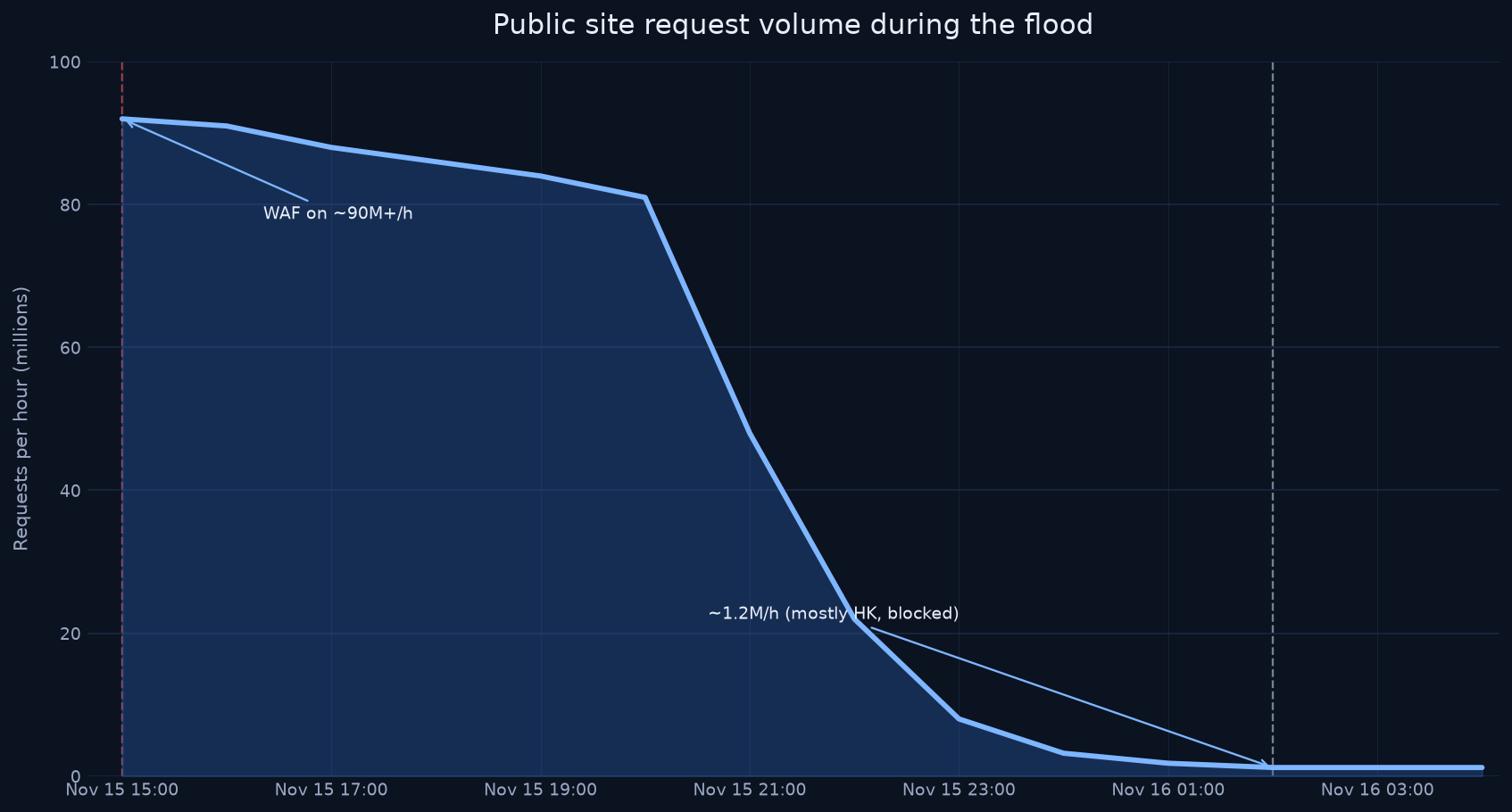
The public site was almost certainly a targeted request flood. We were seeing 90 million-plus requests per hour, mostly from outside the United States (Brazil and Russia first). That is not a busy day. That is someone trying to knock the client offline.
The flood did not stop because we asked nicely
About 11 hours after we started blocking, the bulk of the flood died down. From around 2 a.m. on November 16 the site was at about 1.2 million requests per hour — still ugly, but a different order of magnitude.
Most of those remaining requests were flood attempts from Hong Kong. They kept coming. They did not get through. We had a rule in place that blocked any client originating outside the United States from hitting those two sites.
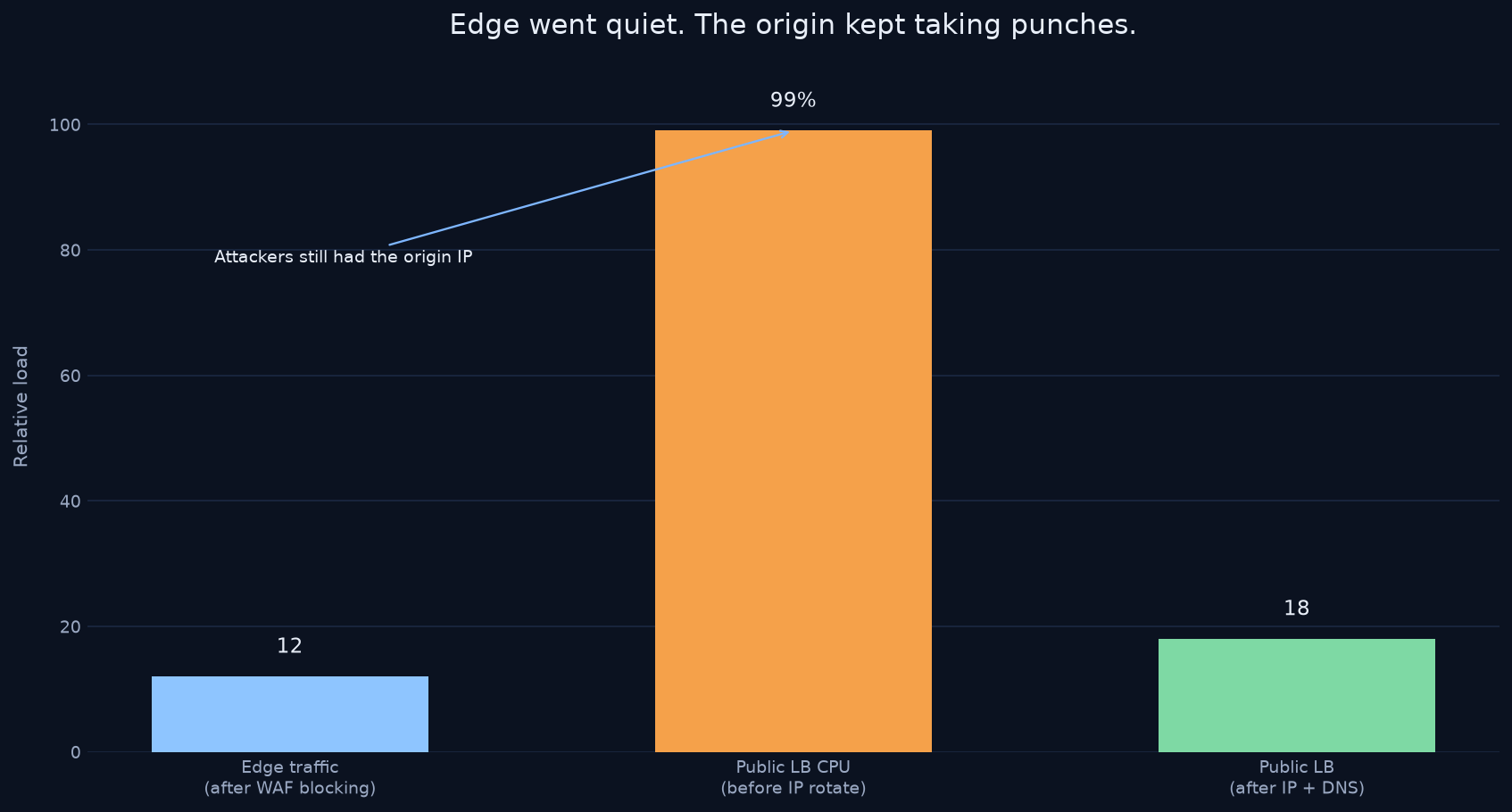
Performance on both sites improved as soon as the edge was filtering. The origin, though, was still in trouble.
The origin was still getting punched
Server errors on the host kept firing. The pattern was the load balancer failing to complete TLS with the edge.
The host confirmed that even after the WAF brought public traffic back to a reasonable level, the load balancer in front of the public site was still at 99% CPU. Something was still flooding it.
We looked at the load-balancer logs. Plenty of client IPs that were not coming through the edge. They were going straight at the origin IP — looking up the DNS A record, or having it already, and bypassing the WAF entirely.
So we did the fast thing. The host rotated the elastic IP on that load balancer, and at 8:30 p.m. on November 16 we pointed DNS at the new address. TLS errors on the public site stopped immediately.
We did not rotate the portal's load-balancer IP. We never saw those TLS errors there after the WAF was on.
An IP swap is obfuscation, not a fix
Without an edge in front, anyone can look up the A record and hit the origin. With an edge, the public name resolves to the edge, not to your load balancer. Even then, swapping IPs is hiding, not hardening.
I told the host the durable fix is to allow only the edge's IP ranges to those load balancers. They were reluctant — it meant a code deployment that could take a week or more — so we took the IP change for speed. I still think the allowlist is the right long-term control.
What we left in place
Both sites were stable afterward. The rules stayed on. Once the site could breathe, we eased rate limiting so we would not clip legitimate users:
- Block traffic originating outside the US
- Block requests to /alert, /.env, and any path containing .cfm
- Block the Brightbot 1.0 user agent and python-requests
- A global rate limit: 600 requests per minute per IP
- The vendor managed ruleset at default, and an OWASP managed ruleset at medium
We also dropped the edge cache TTL from 20 minutes to 10.
That is a wartime config. It worked. Someone on the client side still needed to own the tools day to day, with help and training — not leave the shield in the hands of whoever happened to be on the call.
What I took from it
A WAF in front of a public site is necessary and not sufficient. If the origin IP is still public, the attacker goes around you. If nobody is watching logs, you will celebrate a quiet edge while the load balancer burns.
I built ProtectMyWebsite because of nights like this. We put a shield in front of the site. Rules start in count. After 24 hours, the dashboard shows what's safe to block — one click. The Advisor reads your count window and explains what's safe to promote — you still click once. Origin stays yours. If you would rather not touch DNS, we do it.
If you run public sites and want that shield on yours: scan your site and start a 14-day trial. Also see how to hide the origin IP behind a WAF, the first-hour flood playbook, what WAF count mode is, what's safe to block on a WAF, WAF false positives on forms, pricing, managed WAF for university and college websites, managed WAF for government and public-sector websites, and managed WAF for Drupal sites.
Related
- Hide your origin IP behind a WAF (and allowlist edge IPs only)
- Keep .edu sites up under flood
- What is WAF count mode? (and why you start there)
- What a WAF 403 page means (and why you start in count)
- What's safe to block on a WAF?
- WAF false positives on forms: stop blocking legitimate POSTs
- Pricing
- Managed WAF for multi-site teams
- WAF Watch: WordPress RCEs and login floods